
Shift Carrier - API Documentation
Integration Guide & Reference

Overview
The Shift Carrier API is a comprehensive integration suite that enables seamless shipping and logistics management across multiple courier partners. Using this API suite, you can:
- Fetch cost estimates from multiple courier partners
- Book forward shipments with your preferred carrier
- Create forward orders with detailed product and address information
- Track shipments in real-time
- Cancel shipments when needed
- Manage pickup and delivery addresses
- Simulate order flows for testing
Key Features
- Support for both new address creation and existing address reference using UIDs
- Detailed product information including HSN codes, dimensions, and values
- Multiple payment modes (Prepaid, Cash on Delivery)
- Comprehensive shipment details with weight and dimensions
- Real-time tracking with detailed event timeline
- Multiple courier partner options with ratings
Authentication
Shift APIs use API Key Authentication. To access the API, include your API key in the x-api-key request header.
🔐 API Key Authentication
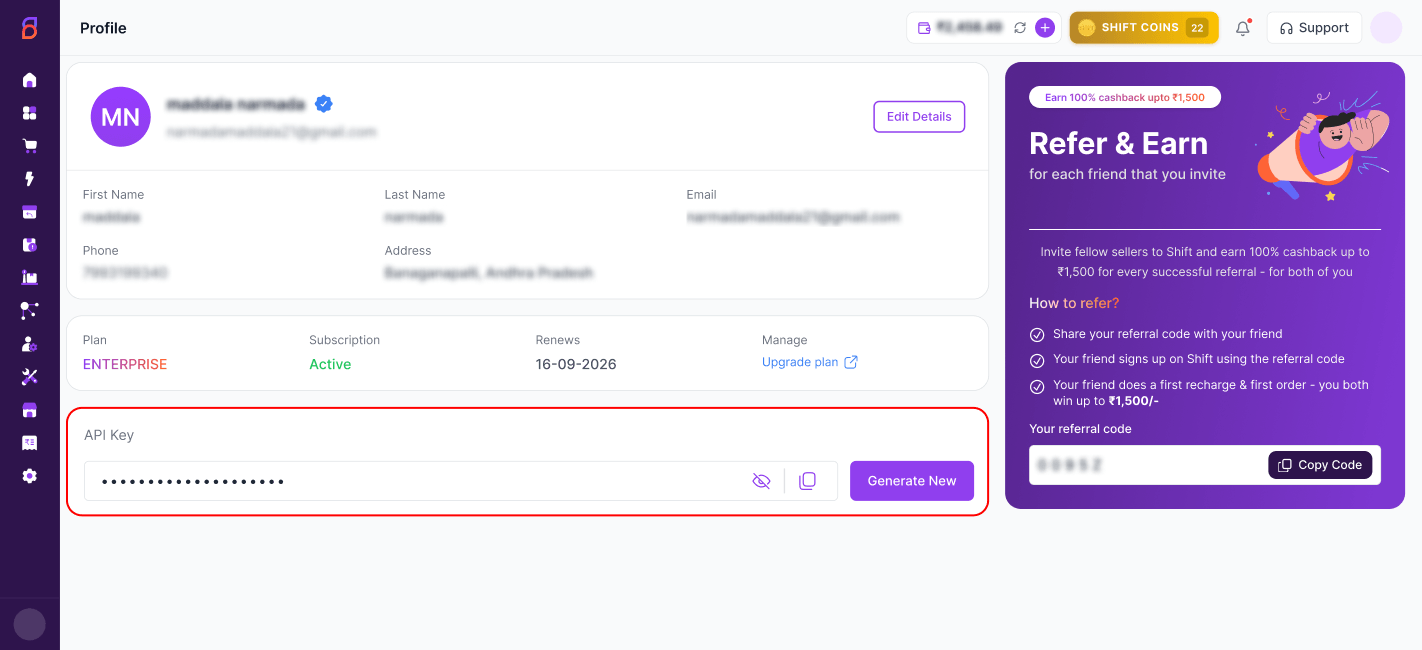
Log in to your Carrier Portal account at carrier.shift.in , navigate to the Profile section, and copy your API Key.
📝 API Key Location:
Include the API Key in Your Request
All API requests require the following request header:
x-api-key: <your_api_key>Replace <your_api_key> with the API key copied from your Carrier Portal profile.
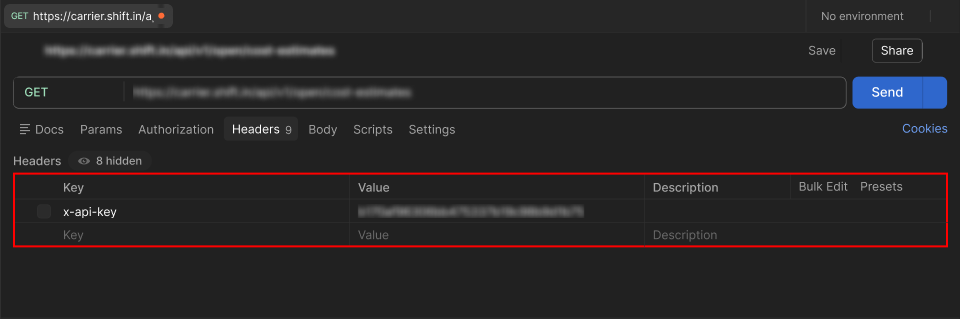
Using Postman
- Open Postman and create a new request.
- Go to the Headers tab.
- Add a new header with the following values:
Key: x-api-key
            Value: <your_api_key>
📝 Postman Screenshot Reference:
Mandatory Account Setup Steps
Before you can start using the Shift Carrier Tracking API, the following setup steps must be completed in your account:
⚠️ Prerequisites for API Access
Ensure all the following steps are completed before making API calls:
| Step | Requirement | Description |
|---|---|---|
| 1 | Growth Plan or Above | Your account must be on the Growth plan or above to access the API. API access is not available on lower tier plans. |
| 2 | KYC Completion | Complete the KYC (Know Your Customer) verification process in your account setup. This is mandatory for all API operations. |
| 3 | Wallet Balance | Add sufficient amount to your wallet. Ensure adequate balance is maintained for booking shipments and covering shipping charges. |
| 4 | Courier Selection | Select and activate your preferred courier partners. In Setup and Manage, select Courier and choose your selected couriers. |
| 5 | Courier Priority | Configure and activate courier priority settings. This determines the order of preference when multiple carriers are available for a shipment. |
📝 Note: API calls will fail if any of the above prerequisites are not met. Please contact support if you need assistance with account setup.
API Endpoints
🧪 QA Environment
https://carrier-qa.shift.in🚀 Production Environment
https://carrier.shift.inAvailable Endpoints
| Method | Endpoint | Description |
|---|---|---|
| POST | /api/v1/open/cost-estimates | Fetch shipping cost estimates |
| POST | /api/v1/open/forward | Book forward shipment |
| POST | /api/v1/open/forward/order | Create forward order |
| GET | /api/v1/open/track | Track an order |
| POST | /api/v1/open/forward/shipment/cancel | Cancel shipment |
| POST | /api/v1/open/address | Create new address |
| PUT | /api/v1/open/address | Update address |
| GET | /api/v1/open/address/{addressId} | Get address details |
| DELETE | /api/v1/open/address/{addressId} | Delete address |
| POST | /api/v1/open/order/{orderId}/simulate/status/{endOrderStatus} | Simulate order flow |
| POST | /api/v1/open/return | Create return shipment |
| GET | /api/v1/open/return/track | Track return shipment |
| POST | /api/v1/open/return/shipment/cancel | Cancel return shipment |
Fetch Cost Estimates
<HOST>/api/v1/open/cost-estimatesHeaders
| Header | Value | Description |
|---|---|---|
| Authorization | Basic <api_key> | Base64-encoded credentials |
| Content-Type | application/json | Request body format |
| siteCode | CARRIER | Site identifier |
Request Example
curl --location '<HOST>/api/v1/open/cost-estimates' \
  --header 'siteCode: CARRIER' \
  --header 'Content-Type: application/json' \
  --header 'Authorization: Basic xxxxxxxxxxxxxxxxxx' \
  --data '{
      "returnOrder": false,
      "codOrder": true,
      "destinationPin": 500081,
      "originPin": 500039,
      "weightInGrams": 250,
      "declaredValue": 1000,
      "packageLength": 10,
      "packageBreadth": 10,
      "packageHeight": 10
  }'
Request Parameters
| Parameter | Type | Description |
|---|---|---|
| returnOrder | Boolean | Whether this is a return order |
| codOrder | Boolean | Whether this is a COD order |
| destinationPin | Integer | Destination pincode |
| originPin | Integer | Origin pincode |
| weightInGrams | Integer | Package weight in grams |
| declaredValue | Integer | Declared value of shipment |
| packageLength | Integer | Package length in cm |
| packageBreadth | Integer | Package breadth in cm |
| packageHeight | Integer | Package height in cm |
Response Example
✅ Success Response
{
      "data": [
          {
              "carrierCode": "DE",
              "carrierName": "Delhivery(Surface)",
              "totalCharges": 43.75,
              "rtoCharges": 43.75,
              "serviceType": "Surface",
              "deliveryMode": "Surface",
              "estimatedDeliveryDate": "2024-02-24T23:06:43.371053151Z",
              "estimatedPickupDate": "2024-02-24T04:36:43.4357551+05:30",
              "rating": 95,
              "onTimePickupRating": 95.0,
              "onTimeDeliveryRating": 90.0,
              "deliveryAccuracyRating": 95.0,
              "liability": "2000",
              "requestId": "x1/pT7jVcxsEwmPEZZo7kt...",
              "totalChargesBreakup": {
                  "shippingCharges": 37.08,
                  "codCharges": 0.0,
                  "gstCharges": 6.67
              }
          }
      ],
      "errorMessage": null
  }
Book Forward Shipment
<HOST>/api/v1/open/forward⚠️ KEY POINTS TO NOTE:
- It is mandatory to fetch cost estimates before booking any forward shipments.
- When cost estimates API is requested, in response you get all possible courier options along with key parameters like shipment price, expected delivery date, etc.
- Pick a courier partner of your choice, then note down the carrierCode and requestId from the response for that carrier.
- When booking a shipment, use the same carrierCode and requestId to book shipment successfully with your desired courier partner.
Request Example
curl --location '<HOST>/api/v1/open/forward' \
  --header 'Content-Type: application/json' \
  --header 'Authorization: Basic xxxxxxxxxxxxxxxx' \
  --data-raw '{
      "carrier_code": "DE",
      "request_id": "x1/pT7jVcxsEwmPEZZo7kt...",
      "order_number": "TEST00001",
      "seller_details": {
          "registered_name": "TEST LLP",
          "registered_address": "Test Seller Address",
          "state": "Test State",
          "gstin": "36AANNN1111E1E1"
      },
      "pickup_location": {
          "name": "Pickup Addr name here",
          "phone": "9900990099",
          "email": "pickupemail@gmail.com",
          "addressUid": 12345
      },
      "delivery_location": {
          "name": "Customer Name",
          "phone": "9988998899",
          "email": "customeremail@gmail.com",
          "address": {
              "address_line_1": "Customer Address Line 1",
              "address_line_2": "Customer Address Line 2",
              "landmark": "--",
              "city": "Customer City",
              "state": "Customer State",
              "country": "India",
              "pincode": "200033"
          }
      },
      "shipment": {
          "shipment_id": "001",
          "reshipped": true,
          "delivery_instructions": "",
          "weight_grams": 500,
          "product_details": [
              {
                  "quantity": "1",
                  "description": "L – Test Product Name",
                  "hsn_code/sku_code": "ABCD",
                  "category_of_goods": "Category",
                  "commodity_value": "1000.00",
                  "weight_grams": 500,
                  "height_cm": 10,
                  "length_cm": 10,
                  "breadth_cm": 10
              }
          ],
          "payment_details": {
              "amount": 1000,
              "payment_mode": "PPD"
          },
          "dimensions": {
              "length_cm": 10,
              "breadth_cm": 10,
              "height_cm": 10
          }
      },
      "label_preferences": {
            "use_label_printer_dimension": true,
            "use_v2_template": true,
            "show_cod_value": false,
            "show_ppd_value": true,
            "show_sender_mobile": true,
            "show_sender_address": true,
            "hide_company_logo": false,
            "hide_product_name": false,
            "hide_product_sku": false,
            "hide_products": false,
            "hide_receiver_mobile": false,
            "show_support_contact": true,
            "hide_powered_by": false,
            "hide_gst_number": false,
            "use_state_jurisdiction_footer": true,
            "custom_text": "",
            "merge_labels": false,
            "label_size": "4inx6in",
            "labels_per_page": 2
        }
  }'
Payload Parameters Guide
| Parameter | Description |
|---|---|
| carrier_code, request_id | Obtained from cost estimates API response |
| order_number | Needs to be unique for each shipment |
| seller_details | Provide your GST details here. Use empty if non-GST client |
| pickup_location | Provide pickup address and contact details. Use either address or addressUid |
| delivery_location | Provide drop off (customer) address and contact details. Use either address or addressUid |
| shipment_id | Optional - unique identifier for the shipment. Not mandatory in shipment payload. |
| payment_mode | Valid values: PPD (Prepaid) or COD (Cash on Delivery) |
| reshipped | Optional - send as true if order is being reshipped after cancellation |
| label_preferences | Optional – Configure and customize the shipping label generated for the shipment. Supported label sizes: 4 × 6 A4 3 × 5 A5 |
Response Example
✅ Success Response
{
      "data": {
          "carrierCode": "DE",
          "trackingNumber": "25338210179723",
          "shippingLabelUrl": "https://carrier-v2-dev-new.s3.ap-south1.amazonaws.com/.../ShippingLabel-115924.pdf",
          "invoiceUrl": "https://carrier-v2-dev-new.s3.ap-south1.amazonaws.com/.../Invoice-115924-1708663858.pdf",
          "manifestUrl": null,
          "success": true,
          "responseMessage": null
      },
      "errorMessage": null
  }
NOTE: The trackingNumber is the AWB number for the booked forward shipment. This can be used to track the shipment status.
Create Forward Order
<HOST>/api/v1/open/forward/orderThe Create Forward Order API allows you to create new forward orders with comprehensive sender, receiver, product, and package details. This API supports various order types including prepaid (PPD) and Cash on Delivery (COD) orders.
Main Request Fields
| Field | Type | Required | Description |
|---|---|---|---|
| orderNumber | String | Required | Unique identifier for the order |
| pickupLocation | Object | Required | Sender/pickup address details |
| dropLocation | Object | Required | Receiver/delivery address details |
| shipments | Object | Required | Package and product details |
Location Object Structure
Each location (pickup/drop) can be specified in two ways:
Option 1: Using Address UID (Existing Address)
| Field | Type | Description |
|---|---|---|
| addressUid | Integer | Reference to existing address ID |
Option 2: Full Address Details (New Address)
| Field | Type | Required | Description |
|---|---|---|---|
| name | String | Required | Contact person name |
| phone | String | Required | Contact phone number |
| String | Required | Contact email address | |
| address | Object | Required | Address details object |
Address Object Structure
| Field | Type | Required | Description |
|---|---|---|---|
| addressLine1 | String | Required | Primary address line |
| addressLine2 | String | Optional | Secondary address line |
| city | String | Required | City name |
| state | String | Required | State name |
| pincode | Integer | Required | Postal code (6-digit Indian pincode) |
Shipments Object Structure
| Field | Type | Required | Description |
|---|---|---|---|
| weightInGrams | Integer | Required | Total package weight in grams |
| product_details | Array | Optional | Array of product detail objects |
| payment_details | Object | Optional | Payment information |
| dimensions | Object | Optional | Package dimensions (length_cm, breadth_cm, height_cm) |
Response Example
✅ Success Response (HTTP 200)
{
      "data": 12345,
      "errorMessage": null
  }
The data field contains the unique order ID generated for the created forward order.
❌ Error Response (HTTP 400)
{
      "data": null,
      "errorMessage": "Invalid order data provided"
  }
Track an Order
<HOST>/api/v1/open/track?orderNumber={orderNumber}Query Parameters
| Parameter | Required | Description |
|---|---|---|
| orderNumber | Required | The unique identifier of the order to track |
Request Example
curl --location '<HOST>/api/v1/open/track?orderNumber=105022' \
  --header 'Authorization: Basic YmV0YXNoaWZ0OlRlc3QxMjM0'
Response Structure
{
      "data": {
          "orderNumber": "105022",
          "expectedDeliveryDate": "2024-02-27",
          "shipmentPickupDate": "2024-02-24",
          "orderStatus": "Ready To Ship",
          "orderStatusCode": "RTS",
          "trackingNumber": "14355980684220",
          "orderedDate": "2024-01-22T15:39:00.000+00:00",
          "buyerName": "Mamta Sehgal",
          "buyerPhoneNum": "7780531087",
          "buyerAddressLine1": "Near shree ram mandir, Punjabi mohalla",
          "buyerAddressLine2": "ward no. 3,nadbai,Bharatpur RajasthanE",
          "buyerAddressLine3": "Bharatpur, Rajasthan",
          "buyerAddressLine4": "India - 321602",
          "senderAddressCity": "Hyderabad",
          "senderAddressState": "Telangana",
          "trackingDetails": [
              {
                  "scanStatus": "Data Received",
                  "scanLocation": "RTO/BRY, BANGALORE, KARNATAKA",
                  "scanDateTime": "2024-01-31T10:36:00.000+00:00"
              },
              {
                  "scanStatus": "Pickup Not Done",
                  "scanLocation": "RTO/BRY, BANGALORE, KARNATAKA",
                  "scanDateTime": "2024-02-01T12:59:00.000+00:00"
              },
              {
                  "scanStatus": "Out For Pickup",
                  "scanLocation": "RTO/BRY, BANGALORE, KARNATAKA",
                  "scanDateTime": "2024-02-02T00:42:00.000+00:00"
              }
          ],
          "carrierName": "Xpressbees",
          "deliveredDate": null
      },
      "errorMessage": null
  }
Tracking Details Object
Each item in the trackingDetails array provides information about a specific event in the shipment's journey:
| Field | Description |
|---|---|
| scanStatus | The current status of the shipment |
| scanLocation | The location where the status was recorded |
| scanDateTime | The date and time when the status was updated |
Cancel Shipment
<HOST>/api/v1/open/forward/shipment/cancelRequest Parameters
| Parameter | Required | Description |
|---|---|---|
| carrier_code | Required | Carrier code for the shipment |
| tracking_number | Required | AWB number assigned by the courier partner |
| cancel_reason | Optional | Reason for shipment cancellation |
Request Example
curl --location '<HOST>/api/v1/open/forward/shipment/cancel' \
  --header 'Content-Type: application/json' \
  --header 'Authorization: Basic xxxxx' \
  --data '{
      "carrier_code": "DE",
      "tracking_number": "9804710002951",
      "cancel_reason": "Customer rejected"
  }'
Response Example
{
      "data": true,
      "errorMessage": null
  }
Return Order APIs
The Return Order APIs allow you to manage reverse logistics — including fetching cost estimates, creating return shipments, tracking them, and cancelling if needed. The flow mirrors the forward shipment flow: estimate → book → track → cancel.
10.1 Return Order Cost Estimate
<HOST>/api/v1/open/cost-estimatesThis uses the same cost estimates endpoint as forward shipments. The key difference is setting "returnOrder": true in the request body.
Request Example
curl --location '<HOST>/api/v1/open/cost-estimates' \
--header 'siteCode: CARRIER' \
--header 'Content-Type: application/json' \
--header 'Authorization: Basic xxxxxxxxxxxxxxxxxx' \
--data '{
    "returnOrder": true,
    "codOrder": true,
    "destinationPin": 500081,
    "originPin": 500032,
    "weightInGrams": 250,
    "declaredValue": 1000,
    "packageLength": 10,
    "packageBreadth": 10,
    "packageHeight": 10
}'
Request Parameters
| Parameter | Type | Description |
|---|---|---|
| returnOrder | Boolean | Must be set to true for return shipments |
| codOrder | Boolean | Whether this is a COD order |
| destinationPin | Integer | Destination pincode (seller's pickup location) |
| originPin | Integer | Origin pincode (customer's location) |
| weightInGrams | Integer | Package weight in grams |
| declaredValue | Integer | Declared value of shipment |
| packageLength | Integer | Package length in cm |
| packageBreadth | Integer | Package breadth in cm |
| packageHeight | Integer | Package height in cm |
📝 Note: The response structure is identical to the forward cost estimates response. Note down the carrierCode and requestId from the response — you will need these to create the return shipment.
10.2 Create Return Shipment
<HOST>/api/v1/open/return⚠️ KEY POINTS TO NOTE:
- It is mandatory to fetch return cost estimates before creating a return shipment.
- Use the carrierCode and requestId from the cost estimates response.
- For return shipments, pickup_location is the customer's address and delivery_location is the seller's address.
- Both locations can be specified using an addressUid (existing address) or full address details.
Request Example
curl --location '<HOST>/api/v1/open/return' \
--header 'Content-Type: application/json' \
--header 'Authorization: Basic xxxxxxxxxxxxxxxxxx' \
--data '{
    "carrier_code": "XB",
    "request_id": "x1/pT7jVcxsEwmPEZZo7kt...",
    "auto_carrier_selection_enabled": false,
    "pickup_location": {
        "addressUid": 311910
    },
    "delivery_location": {
        "addressUid": 306160
    },
    "shipment": {
        "delivery_instructions": "Handle with care",
        "shipment_value": 1000.00,
        "return_reason_code": "CHNGDMND",
        "qc_needed": false,
        "weight_grams": 250,
        "product_details": [
            {
                "quantity": 1,
                "description": "Blue T-Shirt - Size L",
                "hsn_code/sku_code": "SKU-12345",
                "category_of_goods": "Apparel",
                "commodity_value": 1500.00,
                "weight_grams": 500,
                "height_cm": 10,
                "length_cm": 30,
                "breadth_cm": 25
            }
        ],
        "dimensions": {
            "length_cm": 10,
            "breadth_cm": 10,
            "height_cm": 10
        }
    }
}'
Payload Parameters Guide
| Parameter | Required | Description |
|---|---|---|
| carrier_code | Required | Obtained from the return cost estimates API response |
| request_id | Required | Obtained from the return cost estimates API response |
| auto_carrier_selection_enabled | Optional | Set to true to let the system auto-select the best carrier. If false, carrier_code and request_id are used |
| pickup_location | Required | Customer's address (origin of return). Use either addressUid or full address details |
| delivery_location | Required | Seller's address (destination of return). Use either addressUid or full address details |
| shipment_value | Optional | Declared value of the return shipment |
| return_reason_code | Optional | Reason code for the return (e.g., CHNGDMND for Change of Mind) |
| qc_needed | Optional | Set to true if quality check is required upon return delivery |
| delivery_instructions | Optional | Special handling instructions for the courier |
| product_details | Optional | Array of product objects being returned (same structure as forward shipment) |
| dimensions | Optional | Package dimensions in cm (length_cm, breadth_cm, height_cm) |
Response Example
✅ Success Response
{
    "data": {
        "carrierCode": "XB",
        "trackingNumber": "24344960035209",
        "shippingLabelUrl": "https://carrier-v2.s3.ap-south-1.amazonaws.com/.../ShippingLabel-XXXXX.pdf",
        "invoiceUrl": null,
        "manifestUrl": null,
        "success": true,
        "responseMessage": null
    },
    "errorMessage": null
}
NOTE: The trackingNumber returned is the AWB number for the return shipment. Save this — it is required for tracking and cancellation.
10.3 Track Return Shipment
<HOST>/api/v1/open/return/track?returnAWBNumber={returnAWBNumber}Query Parameters
| Parameter | Required | Description |
|---|---|---|
| returnAWBNumber | Required | The AWB/tracking number returned when the return shipment was created |
Request Example
curl --location '<HOST>/api/v1/open/return/track?returnAWBNumber=243449600352189' \
--header 'Authorization: Basic xxxxxxxxxxxxxxxxxx'
📝 Note: The tracking response structure is identical to the forward shipment tracking response, including the trackingDetails array with scanStatus, scanLocation, and scanDateTime for each event.
10.4 Cancel Return Shipment
<HOST>/api/v1/open/return/shipment/cancelRequest Parameters
| Parameter | Required | Description |
|---|---|---|
| carrier_code | Required | Carrier code used when the return shipment was created |
| tracking_number | Required | AWB number of the return shipment to cancel |
Request Example
curl --location '<HOST>/api/v1/open/return/shipment/cancel' \
--header 'Content-Type: application/json' \
--header 'Authorization: Basic xxxxxxxxxxxxxxxxxx' \
--data '{
    "carrier_code": "XB",
    "tracking_number": "24344960035209"
}'
Response Example
✅ Success Response
{
    "data": true,
    "errorMessage": null
}
Address Management
Create a New Address
<HOST>/api/v1/open/addressRequest Parameters
| Parameter | Required | Description |
|---|---|---|
| addressName | Required | Name for the address |
| addressLine1 | Required | Max 60 chars – do not send garbage chars |
| addressLine2 | Required | Max 60 chars – do not send garbage chars |
| zipCode | Required | 6-digit Indian pincode only |
| addressType | Optional | SENDER (pickup) or RECEIVER (customer) |
| contactName | Required | Max 60 chars |
| Required | Proper email format is mandatory | |
| phoneNumber | Required | Used for SMS and WhatsApp communication |
| city | Optional | Auto-populated based on zipcode |
| state | Optional | Auto-populated based on zipcode |
NOTE: If city-state data is not available with Google Maps API for the given pincode, then the API call will fail.
Request Example
curl --location --request POST '<HOST>/api/v1/open/address' \
  --header 'Authorization: Basic XXX==' \
  --header 'sitecode: CARRIER' \
  --header 'Content-Type: application/json' \
  --data-raw '{
      "addressName": "John Doe'\''s Residence",
      "addressLine1": "123 Main St",
      "addressLine2": "Apt 4B",
      "zipCode": 500098,
      "addressType": "SENDER",
      "contactName": "John Doe",
      "email": "johndoe@example.com",
      "phoneNumber": "+918885000000"
  }'
Response Example
{
      "data": 99880,
      "errorMessage": null
  }
The data field contains the unique address ID which can be used to create orders.
Update an Existing Address
<HOST>/api/v1/open/addressRequest Example
curl --location --request PUT '<HOST>/api/v1/open/address' \
  --header 'Authorization: Basic XXX' \
  --header 'sitecode: CARRIER' \
  --header 'Content-Type: application/json' \
  --data-raw '{
      "addressId": 59673,
      "addressName": "John Donut'\''s Residence",
      "addressLine1": "123 Main St",
      "addressLine2": "Apt 4B",
      "city": "Hyderabad",
      "state": "TG",
      "zipCode": 500098,
      "addressType": "SENDER",
      "contactName": "John Donut",
      "email": "johndoe@example.com",
      "phoneNumber": "+918885000000"
  }'
Response Example
{
      "data": true,
      "errorMessage": null
  }
Get Address Details
<HOST>/api/v1/open/address/{addressId}Request Example
curl --location --request GET '<HOST>/api/v1/open/address/59673' \
  --header 'Authorization: Basic XXX' \
  --header 'sitecode: CARRIER'
Response Example
{
      "data": {
          "addressId": 59673,
          "addressName": "John Donut's Residence",
          "addressLine1": "123 Main St",
          "addressLine2": "Apt 4B",
          "city": "Hyderabad",
          "state": "Telangana",
          "zipCode": 500098,
          "addressType": "SENDER",
          "contactId": 20915,
          "contactName": "John Donut",
          "email": "johndoe@example.com",
          "phoneNumber": "+91888000000"
      },
      "errorMessage": null
  }
Delete an Address
<HOST>/api/v1/open/address/{addressId}Request Example
curl --location --request DELETE '<HOST>/api/v1/open/address/59673' \
  --header 'Authorization: Basic XXX' \
  --header 'sitecode: CARRIER'
Response Example
{
      "data": true,
      "errorMessage": null
  }
Order Simulation API
<HOST>/api/v1/open/order/{orderId}/simulate/status/{endOrderStatus}Request Parameters
| Parameter | Description |
|---|---|
| orderId | Unique Order Id for testing order flow |
| endOrderStatus | Valid values: DLV (Delivered flow) or RTO_DLV (RTO flow) |
Request Example
curl --location --request POST 'http://localhost:8080/api/v1/open/order/250962/simulate/status/DLV' \
  --header 'Authorization: Basic XXX' \
  --header 'sitecode: CARRIER' \
  --header 'Content-Type: application/json'
The response will be of content type text/event-stream. The response is streamed to the caller with status updates for each stage of the simulation.
Sample Streamed Response
{
      "simulationStatusMap": {
          "NEW": {
              "success": true,
              "statusDescription": "Order fetched successfully. Order Current status is NEW. Simulation starting...",
              "inProgress": false,
              "pending": false
          },
          "RTS": {
              "success": true,
              "statusDescription": "All eligible actions (Communication, Financial, Marketplace updates etc) simulated successfully.",
              "inProgress": false,
              "pending": false
          },
          "INT": {
              "success": true,
              "statusDescription": "All eligible actions simulated successfully.",
              "inProgress": false,
              "pending": false
          },
          "OFD": {
              "success": true,
              "statusDescription": "All eligible actions simulated successfully.",
              "inProgress": false,
              "pending": false
          },
          "DLV": {
              "success": true,
              "statusDescription": "All eligible actions simulated successfully.",
              "inProgress": false,
              "pending": false
          }
      }
  }
Status Codes Reference
The orderStatusCode can include the following values:
| Status Code | Status Description | Comments |
|---|---|---|
| NEW | New | When a new order is created, it is in New state |
| RTS | Ready To Ship | When a shipment is booked for an order. Implies waiting for pickup |
| INT | In Transit | Order moves to this state post successful pickup by courier partner |
| OFD | Out for Delivery | Order moves to this state when shipment is out for delivery |
| DLV | Delivered | Order moves to this state when shipment is delivered to buyer |
| RTO_INT | Returning to Origin | When shipment is rejected by buyer and is returning back to seller |
| RTO_DLV | Returned to Origin | When RTO is complete and shipment is delivered back to seller |
| CNX | Cancelled | When seller cancels the order through portal |
| UND | Undelivered | Could be an interim state during delivery attempts |
| LST | Lost/Damaged | When there is an issue with the shipment from courier partner |
| HLD | Hold | When seller archives the order from portal |
Use Cases & Examples
Use Case 1: Basic Forward Order
Creates a simple forward order with minimal required fields for quick order processing.
{
      "orderNumber": "ORD-001",
      "pickupLocation": {
          "name": "Sender Name",
          "address": {
              "addressLine1": "123 Sender St",
              "addressLine2": "Suite 100",
              "city": "SenderCity",
              "state": "SenderState",
              "pincode": 500001
          },
          "phone": "9000000001",
          "email": "sender@example.com"
      },
      "dropLocation": {
          "name": "Receiver Name",
          "address": {
              "addressLine1": "456 Receiver Ave",
              "addressLine2": "Apt 202",
              "city": "ReceiverCity",
              "state": "ReceiverState",
              "pincode": 500002
          },
          "phone": "9000000002",
          "email": "receiver@example.com"
      },
      "shipments": {
          "weightInGrams": 1500
      }
  }
Use Case 2: Prepaid Order with Product Details
Creates a comprehensive prepaid order with detailed product information, ideal for e-commerce shipments.
{
      "orderNumber": "ORD-002-PPD",
      "pickupLocation": {
          "name": "Electronics Store",
          "address": {
              "addressLine1": "789 Tech Park",
              "addressLine2": "Building A, Floor 3",
              "city": "Hyderabad",
              "state": "Telangana",
              "pincode": 500081
          },
          "phone": "9876543210",
          "email": "store@techpark.com"
      },
      "dropLocation": {
          "name": "John Doe",
          "address": {
              "addressLine1": "101 Customer Street",
              "addressLine2": "Apartment 505",
              "city": "Bangalore",
              "state": "Karnataka",
              "pincode": 560001
          },
          "phone": "9123456789",
          "email": "john@example.com"
      },
      "shipments": {
          "weightInGrams": 2500,
          "product_details": [
              {
                  "quantity": 2,
                  "description": "Wireless Headphones - Black",
                  "hsn_code/sku_code": "WHB-001",
                  "category_of_goods": "Electronics",
                  "commodity_value": 2999.99,
                  "weight_grams": 500,
                  "height_cm": 20,
                  "length_cm": 15,
                  "breadth_cm": 10
              }
          ],
          "payment_details": {
              "payment_mode": "PPD",
              "amount": 6499.97
          },
          "dimensions": {
              "length_cm": 25,
              "breadth_cm": 20,
              "height_cm": 15
          }
      }
  }
Use Case 3: Cash on Delivery (COD) Order
Creates a COD order where payment is collected upon delivery, common for fashion and retail items.
{
      "orderNumber": "ORD-003-COD",
      "pickupLocation": {
          "name": "Fashion Boutique",
          "address": {
              "addressLine1": "Mall Road",
              "addressLine2": "Shop No. 45",
              "city": "Mumbai",
              "state": "Maharashtra",
              "pincode": 400001
          },
          "phone": "9988776655",
          "email": "fashion@boutique.com"
      },
      "dropLocation": {
          "name": "Sarah Johnson",
          "address": {
              "addressLine1": "Green Valley Apartments",
              "addressLine2": "Flat 302, Tower B",
              "city": "Pune",
              "state": "Maharashtra",
              "pincode": 411001
          },
          "phone": "9876543210",
          "email": "sarah@example.com"
      },
      "shipments": {
          "weightInGrams": 800,
          "product_details": [
              {
                  "quantity": 1,
                  "description": "Designer Dress - Red",
                  "hsn_code/sku_code": "DD-RED-L",
                  "category_of_goods": "Apparel",
                  "commodity_value": 3500.00,
                  "weight_grams": 400,
                  "height_cm": 5,
                  "length_cm": 40,
                  "breadth_cm": 30
              }
          ],
          "payment_details": {
              "payment_mode": "COD",
              "amount": 4500.00,
              "codCollectibleAmount": 4500.00
          },
          "dimensions": {
              "length_cm": 45,
              "breadth_cm": 35,
              "height_cm": 10
          }
      }
  }
Use Case 4: Using Existing Address UIDs
Efficiently creates orders using pre-registered address UIDs, reducing data redundancy and processing time.
{
      "orderNumber": "ORD-004-EXISTING",
      "pickupLocation": {
          "addressUid": 59673
      },
      "dropLocation": {
          "addressUid": 59674
      },
      "shipments": {
          "weightInGrams": 1200,
          "product_details": [
              {
                  "quantity": 1,
                  "description": "Book - Programming Guide",
                  "hsn_code/sku_code": "BK-PG-001",
                  "category_of_goods": "Books",
                  "commodity_value": 599.00,
                  "weight_grams": 1200,
                  "height_cm": 3,
                  "length_cm": 24,
                  "breadth_cm": 18
              }
          ],
          "payment_details": {
              "payment_mode": "PPD",
              "amount": 599.00
          },
          "dimensions": {
              "length_cm": 24,
              "breadth_cm": 18,
              "height_cm": 3
          }
      }
  }
Use Case 5: Mixed Address Order
Combines existing pickup address UID with new drop location details for flexible order processing.
{
      "orderNumber": "ORD-005-MIXED",
      "pickupLocation": {
          "addressUid": 59673
      },
      "dropLocation": {
          "name": "New Customer",
          "address": {
              "addressLine1": "789 New Street",
              "addressLine2": "Building C",
              "city": "Delhi",
              "state": "Delhi",
              "pincode": 110001
          },
          "phone": "9876543210",
          "email": "newcustomer@example.com"
      },
      "shipments": {
          "weightInGrams": 750,
          "product_details": [
              {
                  "quantity": 3,
                  "description": "T-Shirt - Cotton",
                  "hsn_code/sku_code": "TS-CTN-M",
                  "category_of_goods": "Apparel",
                  "commodity_value": 399.00,
                  "weight_grams": 250,
                  "height_cm": 2,
                  "length_cm": 30,
                  "breadth_cm": 25
              }
          ],
          "payment_details": {
              "payment_mode": "COD",
              "amount": 1197.00,
              "codCollectibleAmount": 1197.00
          },
          "dimensions": {
              "length_cm": 30,
              "breadth_cm": 25,
              "height_cm": 6
          }
      }
  }
Error Handling
The Shift Carrier Tracking API uses a consistent error structure to provide feedback on failed operations. When an API call fails, the response will include an errorMessage field with a descriptive message of what went wrong, while the data field will be null.
Error Response Structure
{
      "data": null,
      "errorMessage": "string"
  }
Common Error Messages
Order Not Found
When an order number does not correspond to any existing order in the system:
{
      "data": null,
      "errorMessage": "Order not found for given order number 105099;"
  }
Invalid Order Data
When required fields are missing or invalid data is provided:
{
      "data": null,
      "errorMessage": "Invalid order data provided"
  }
Address Validation Failed
When city-state data is not available for the given pincode:
{
      "data": null,
      "errorMessage": "Unable to validate address for given pincode"
  }